Mini Tank Motor Assembly
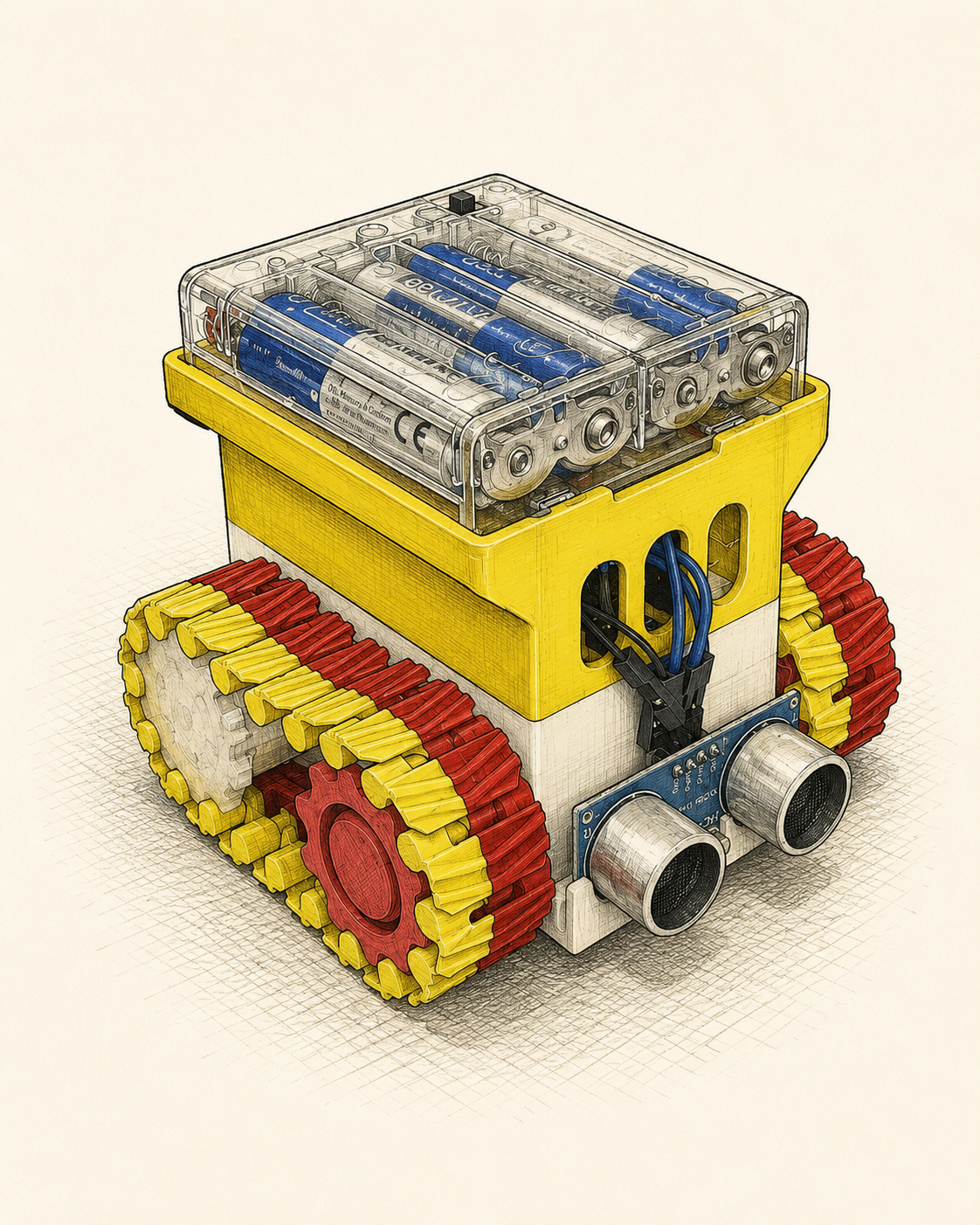
This article walks through building the physical mini tank platform from loose parts into a working tracked robot. It covers the basic chassis assembly, motor driver wiring, ultrasonic sensor placement, and provides starter firmware code for web-based movement control and simple obstacle avoidance.
The goal is to create a small ESP32-C3 tracked robot base with dual TT motors, an L9110S motor driver, an HC-SR04 ultrasonic sensor, and a battery holder mounted into a layered chassis.
The platform can later be used as the movement base for an AI companion robot, a small autonomous rover, or a classroom robotics demo.
Parts Overview
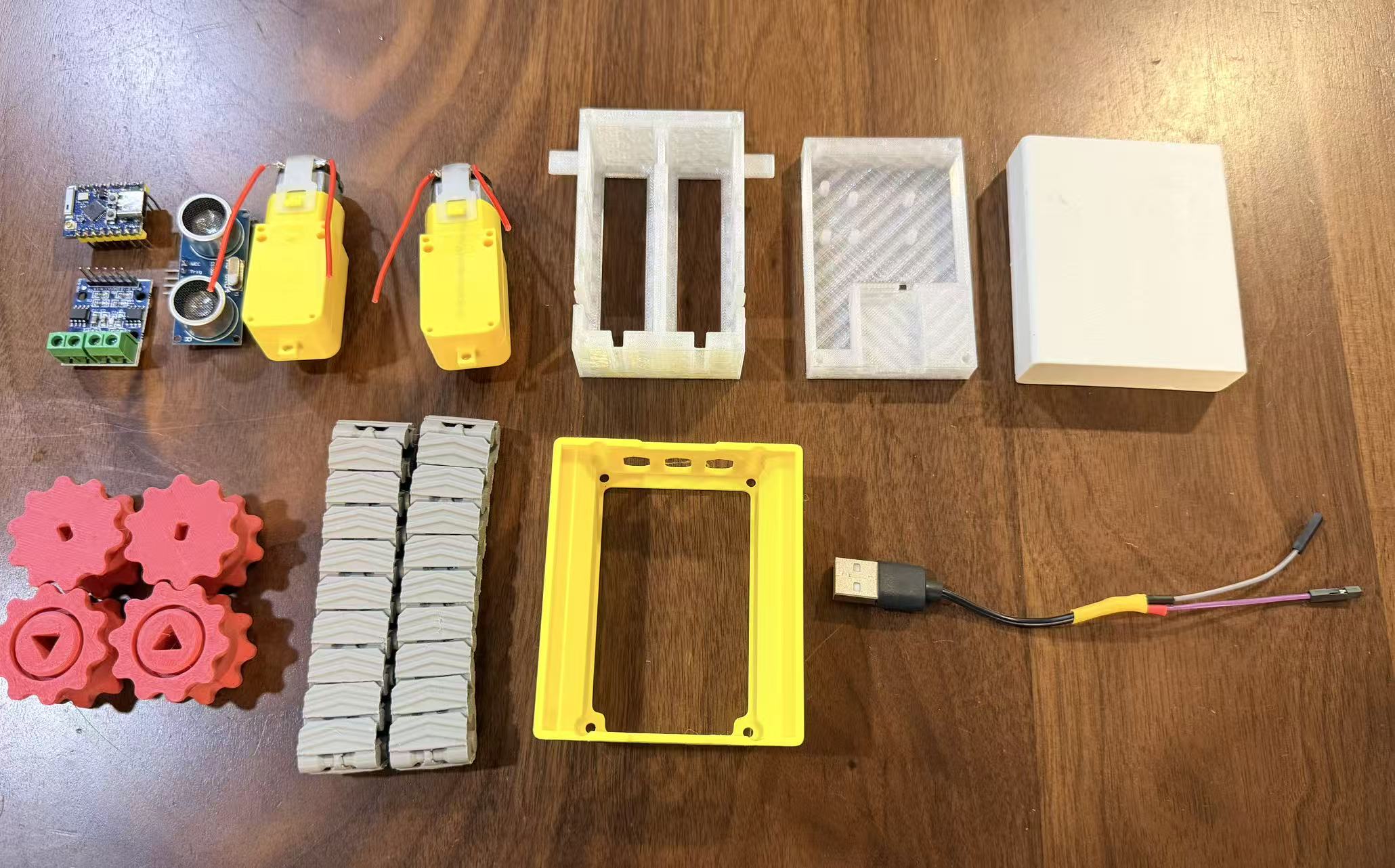
The first photo shows the complete set of components:
| Part | Quantity | Notes |
|---|---|---|
| Tank chassis | 1 | Main lower body |
| Body covers | 2 | Upper covers for electronics and battery holder |
| Tracks and sprockets | 2 sets | Left and right drive assemblies |
| Battery holder | 1 | Power source mount |
| TT motors | 2 | Left and right drive motors |
| ESP32-C3 Mini | 1 | Main microcontroller |
| L9110S motor driver | 1 | Dual motor driver board |
| HC-SR04 ultrasonic sensor | 1 | Distance sensing module |
| Jumper wires | Several | Motor, sensor, and power wiring |
1. Install TT Motors Into the Chassis
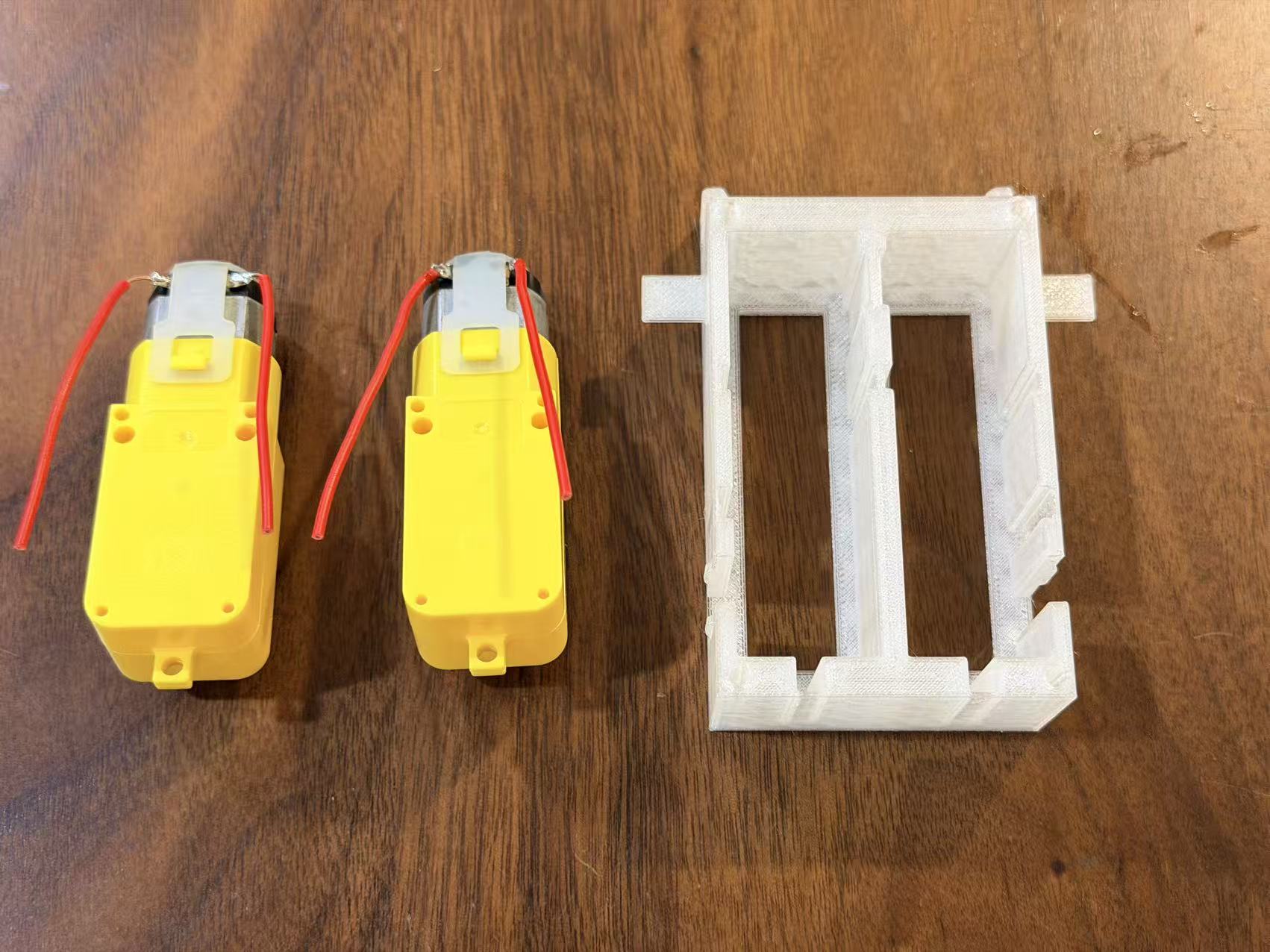
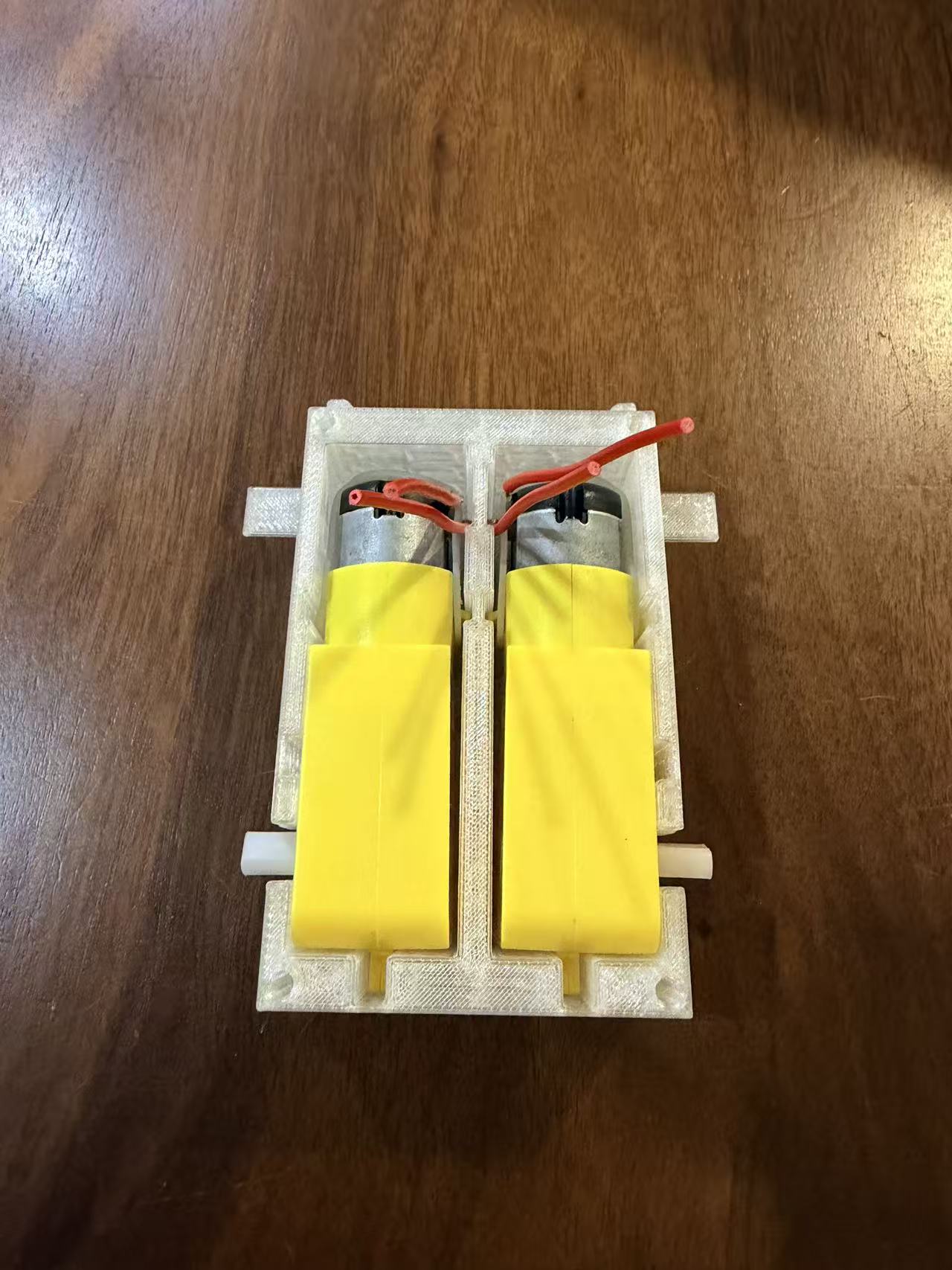
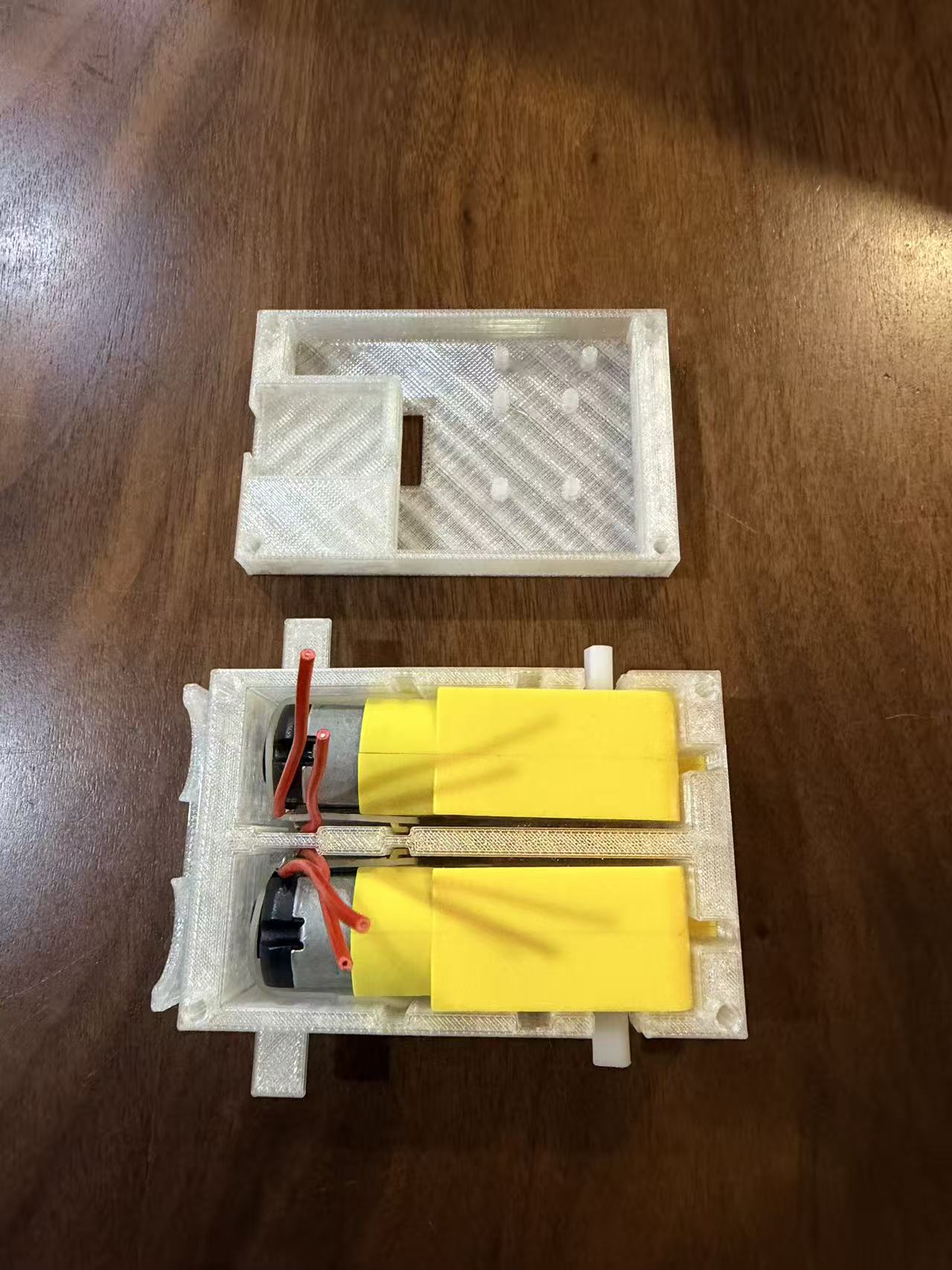
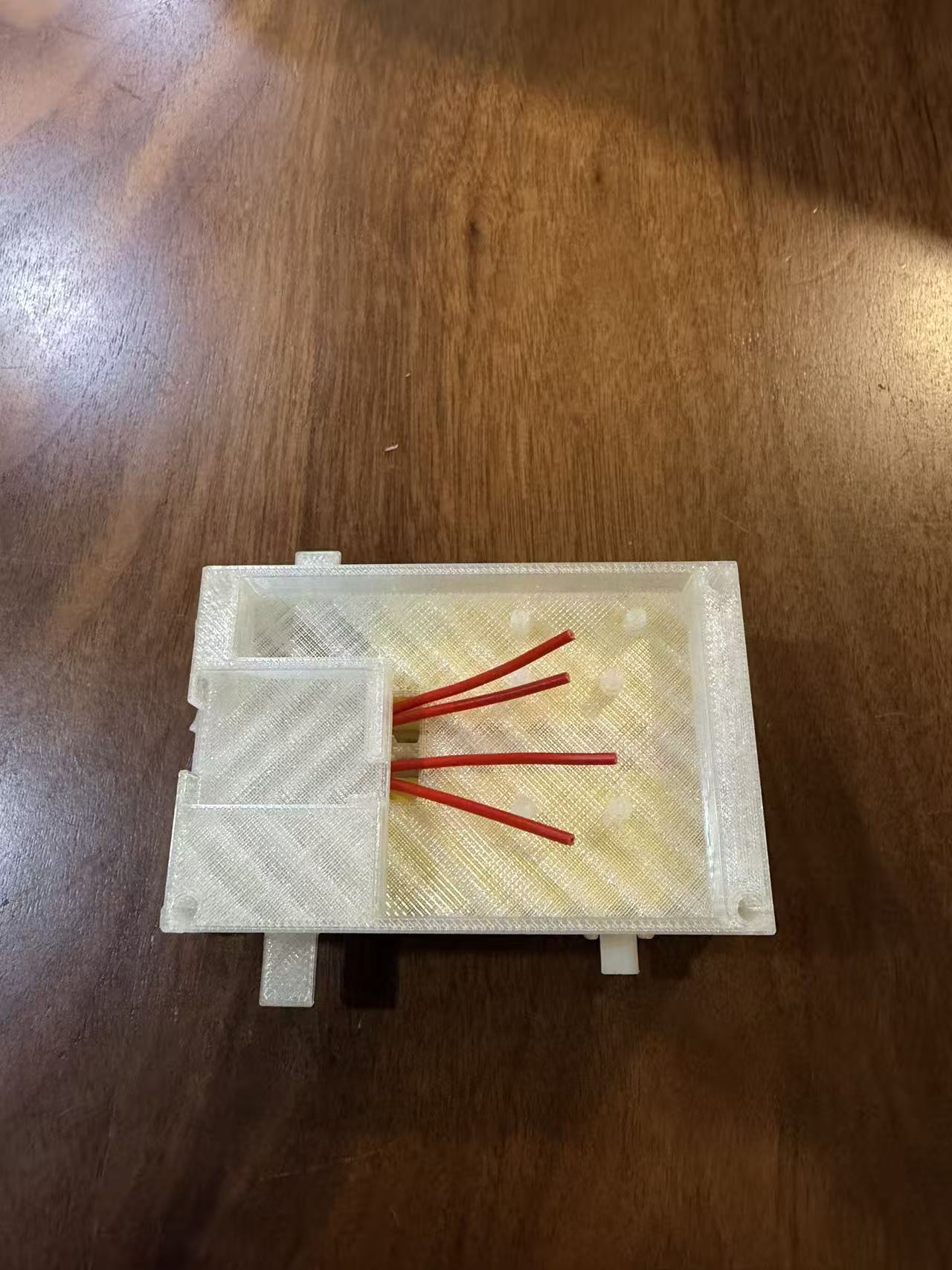
Figures 2 to 5 show the TT motor installation process. Place the two TT motors into the tank chassis, align the motor shafts with the sprocket positions, and make sure the wires are routed toward the electronics area before closing the structure.
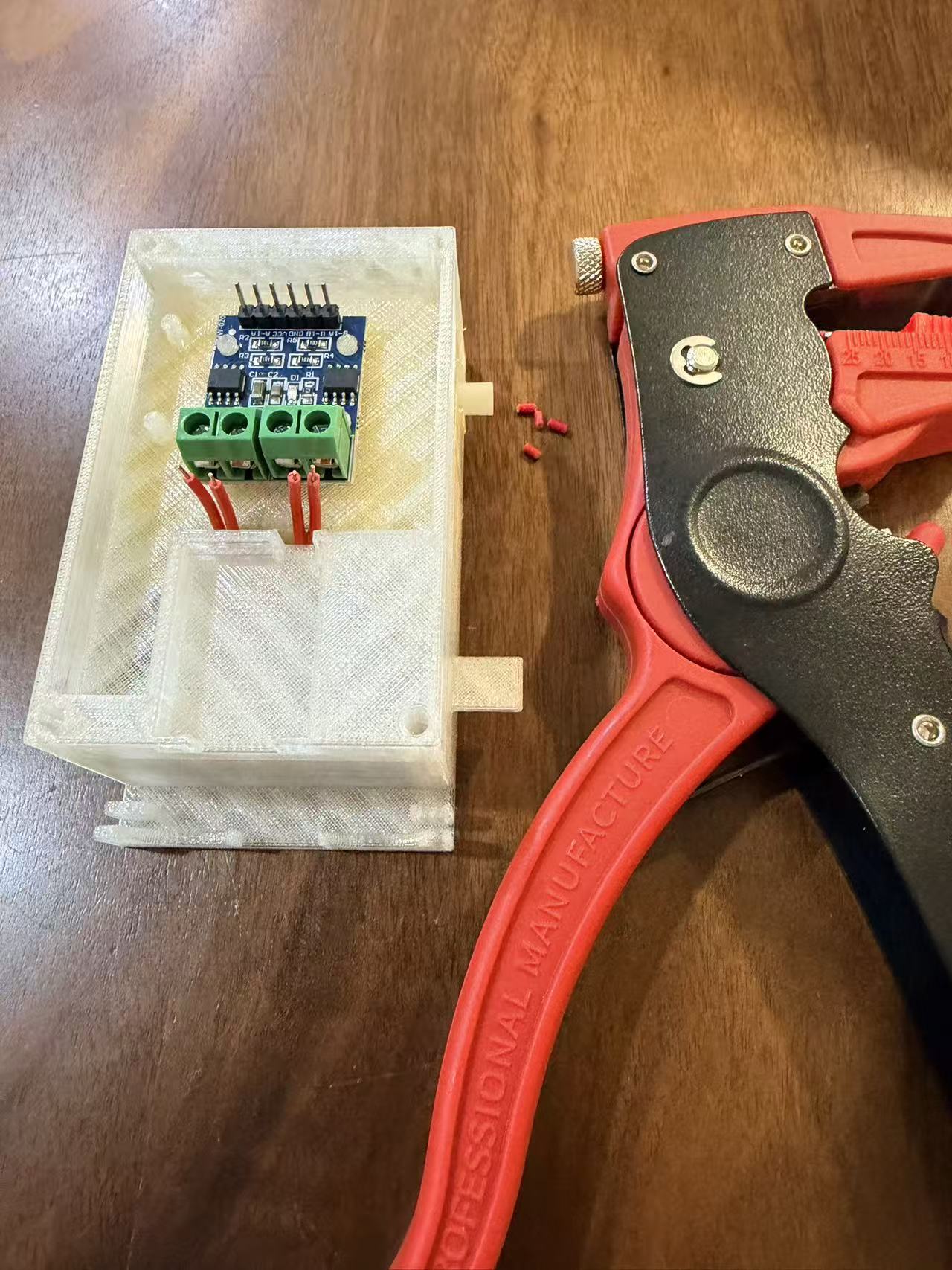
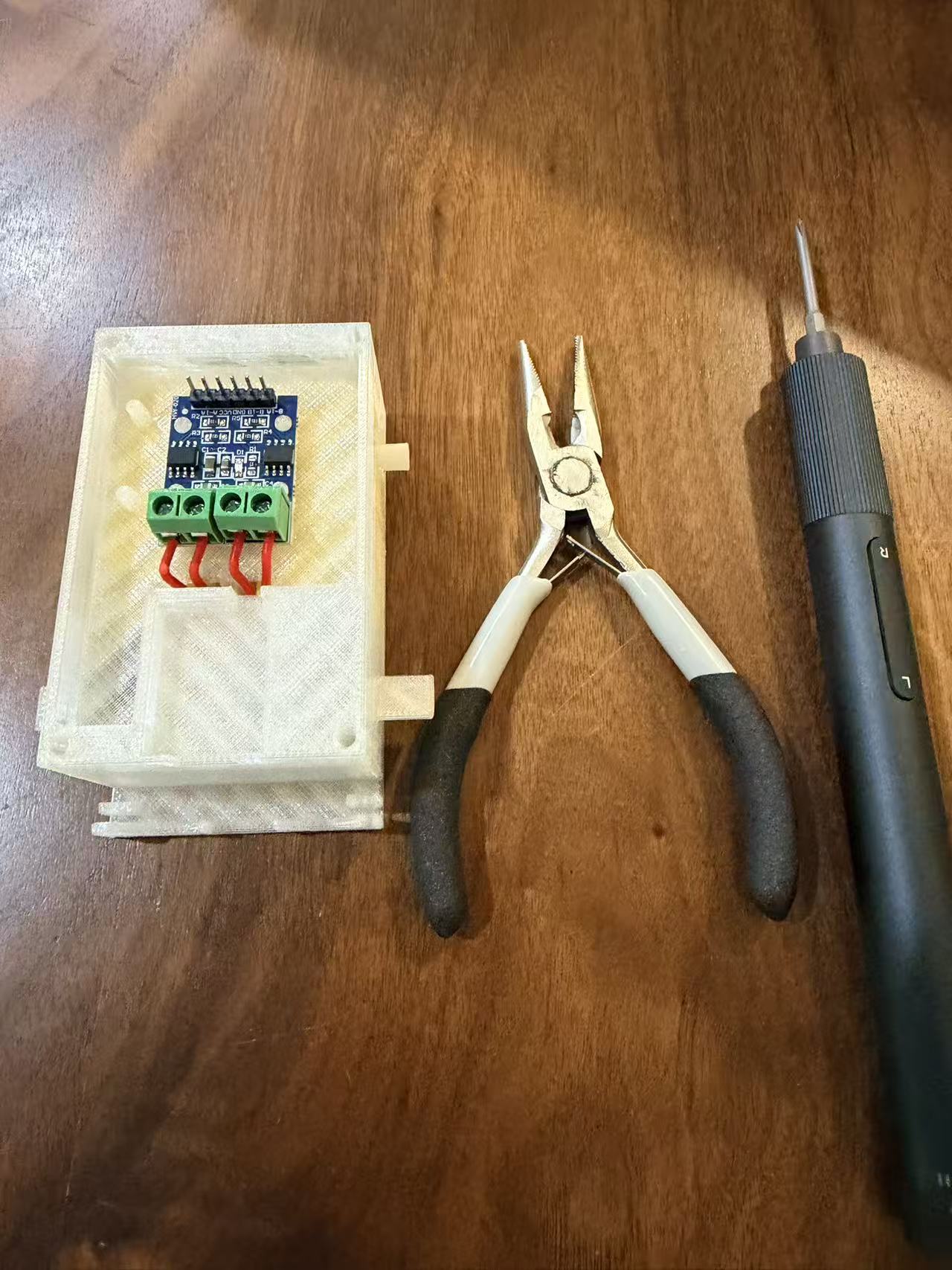
2. Prepare Motor Wiring to L9110S
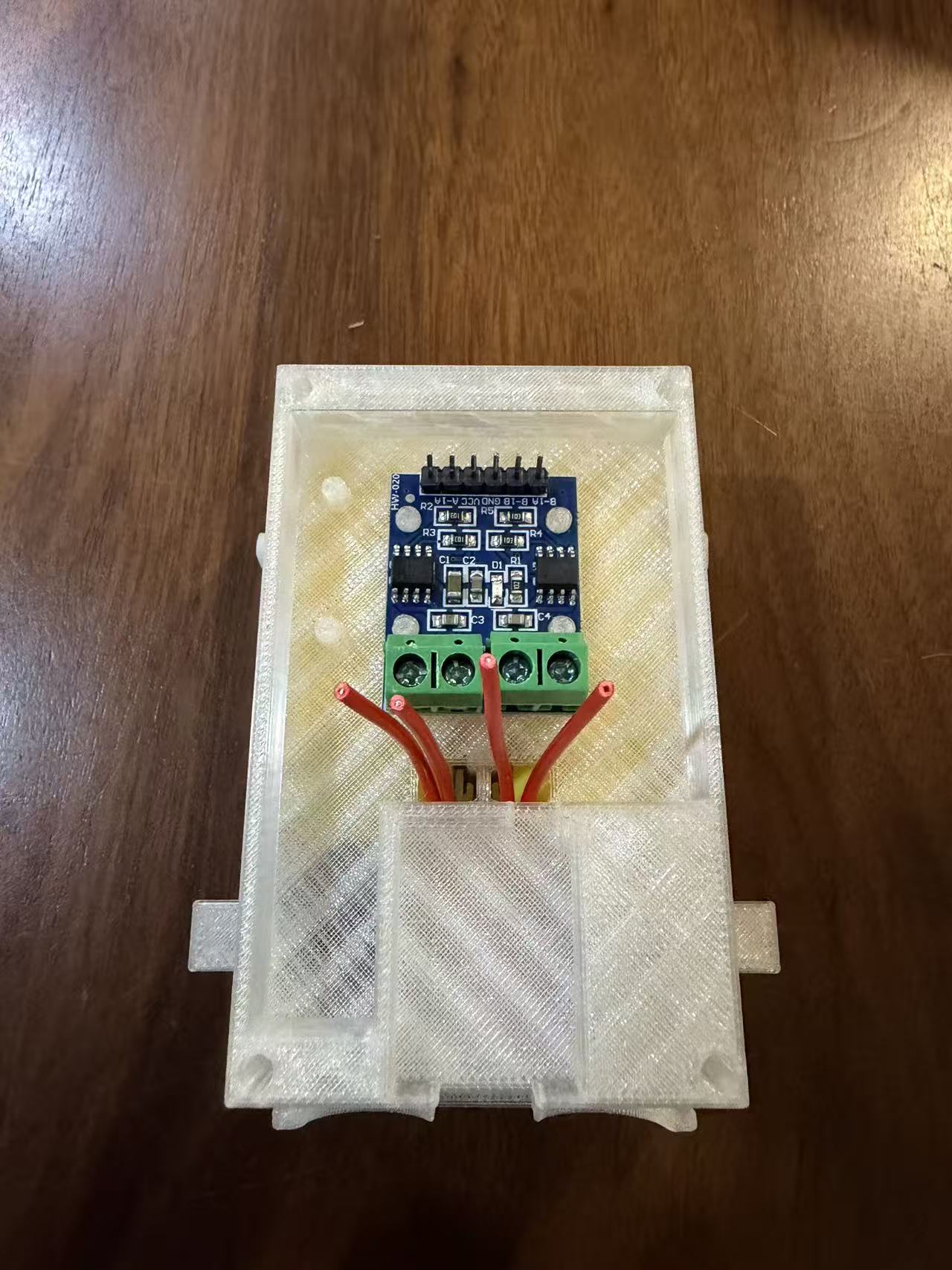
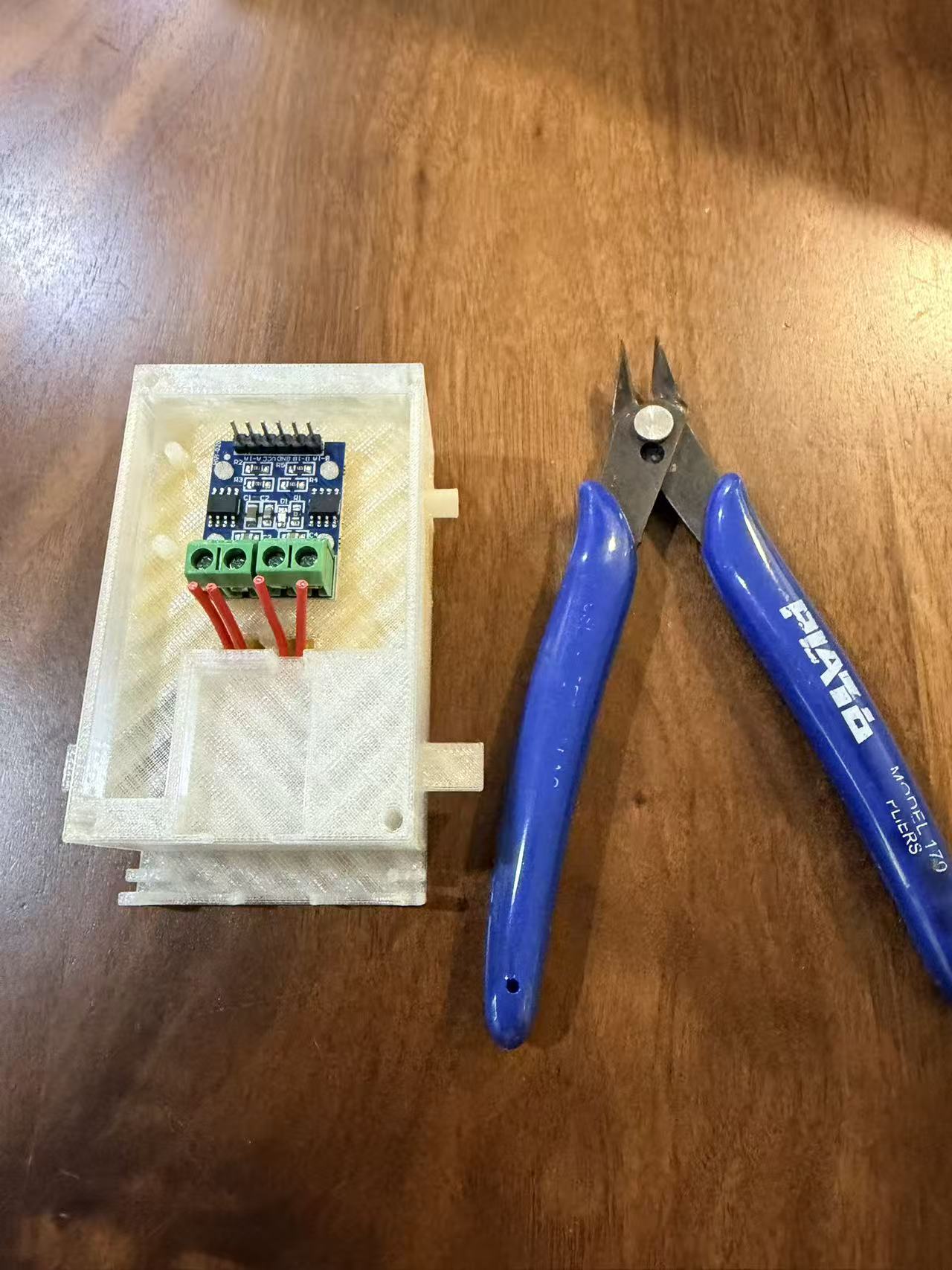
Figures 6.1 to 6.4 show the motor wiring preparation. The two motor outputs are connected to the L9110S driver channels. Keep the wiring short enough to fit inside the top cover, but leave enough slack for maintenance and debugging.
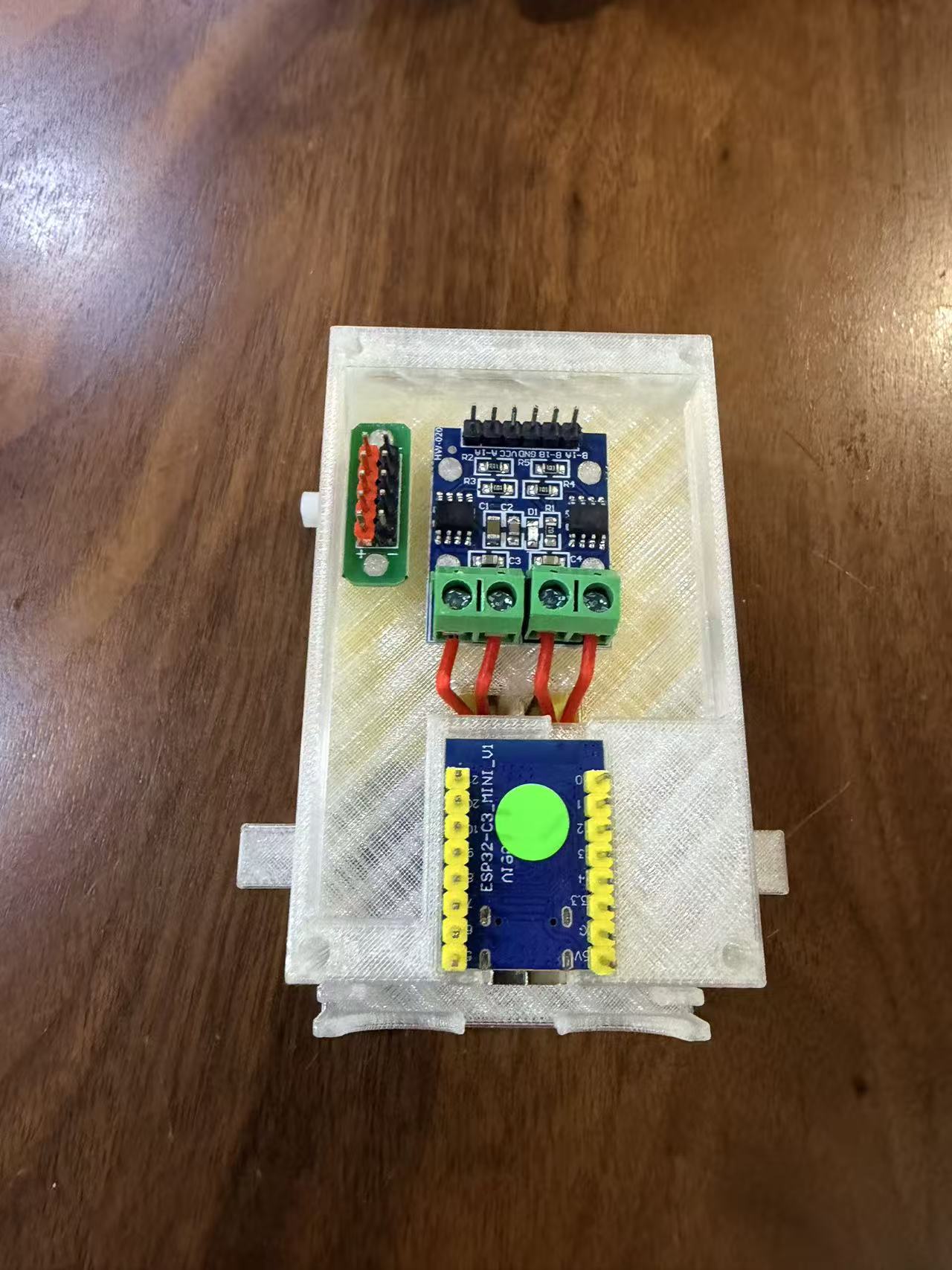
3. Mount ESP32-C3 Mini and DC Bus
Figure 7 shows the ESP32-C3 Mini placed into its slot. A small DC bus is also added to simplify power distribution from the battery holder to the driver board and controller.
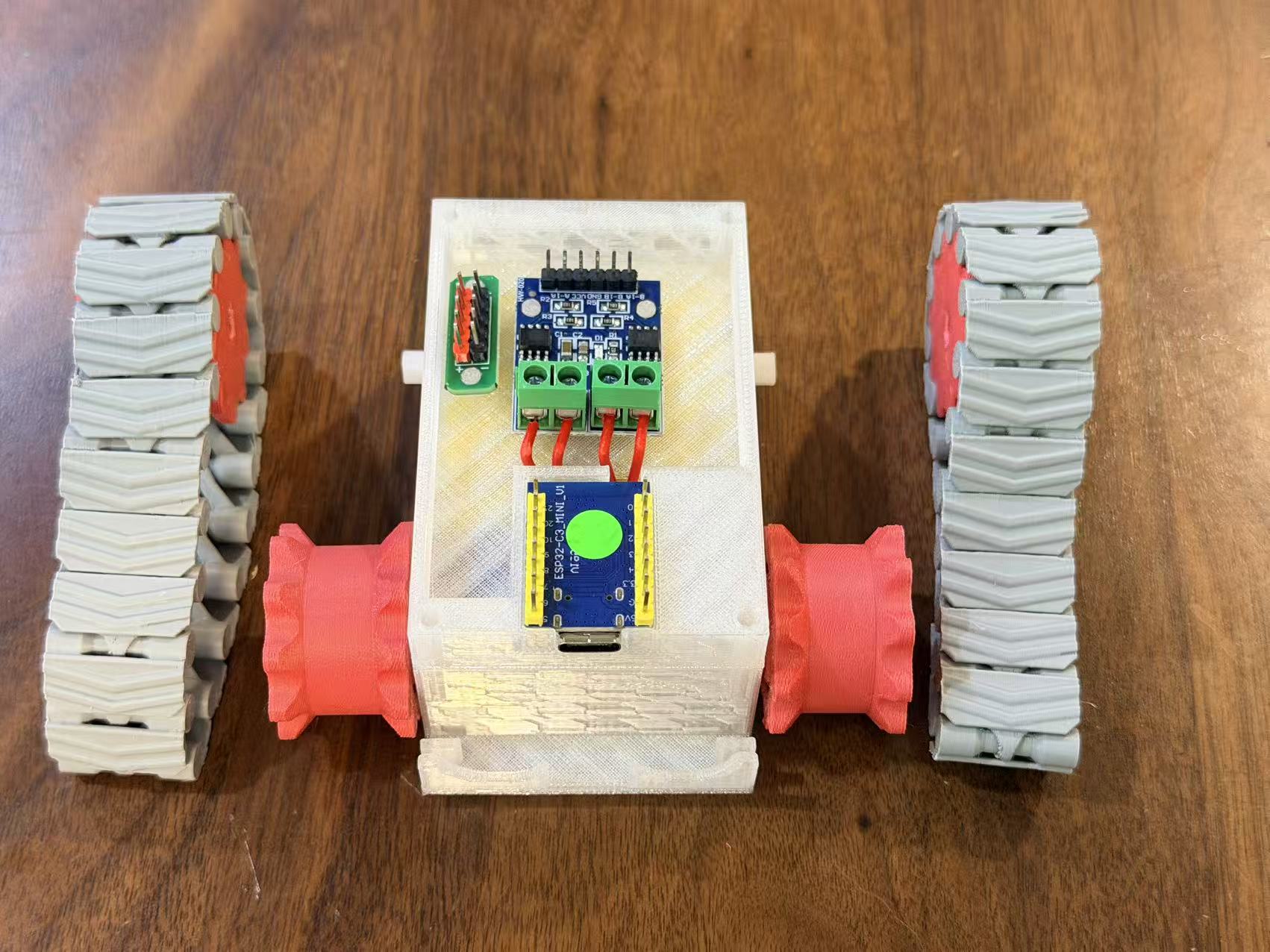
4. Install Sprockets and Tracks
Figures 8.1 and 8.2 show the mechanical drive assembly. Install the sprockets on the TT motor shafts and passive axle positions, then wrap the tracks around both sides. Check that both tracks rotate freely before continuing.
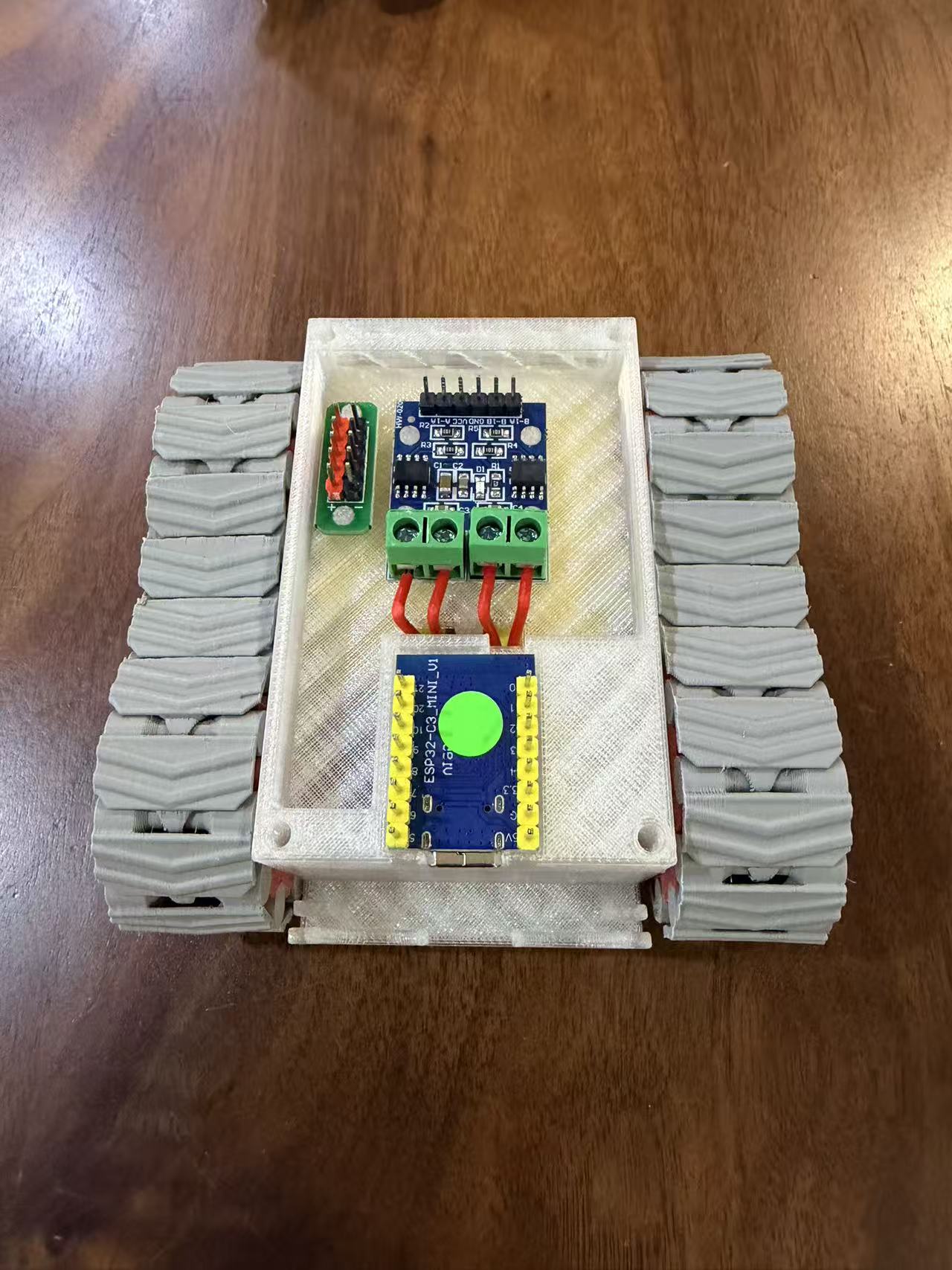
5. Connect Electronics
Figures 9 and 10 show the wiring stage. The L9110S driver receives control signals from the ESP32-C3 Mini. The HC-SR04 ultrasonic sensor is connected for distance detection. Power is routed through the DC bus from the battery holder.
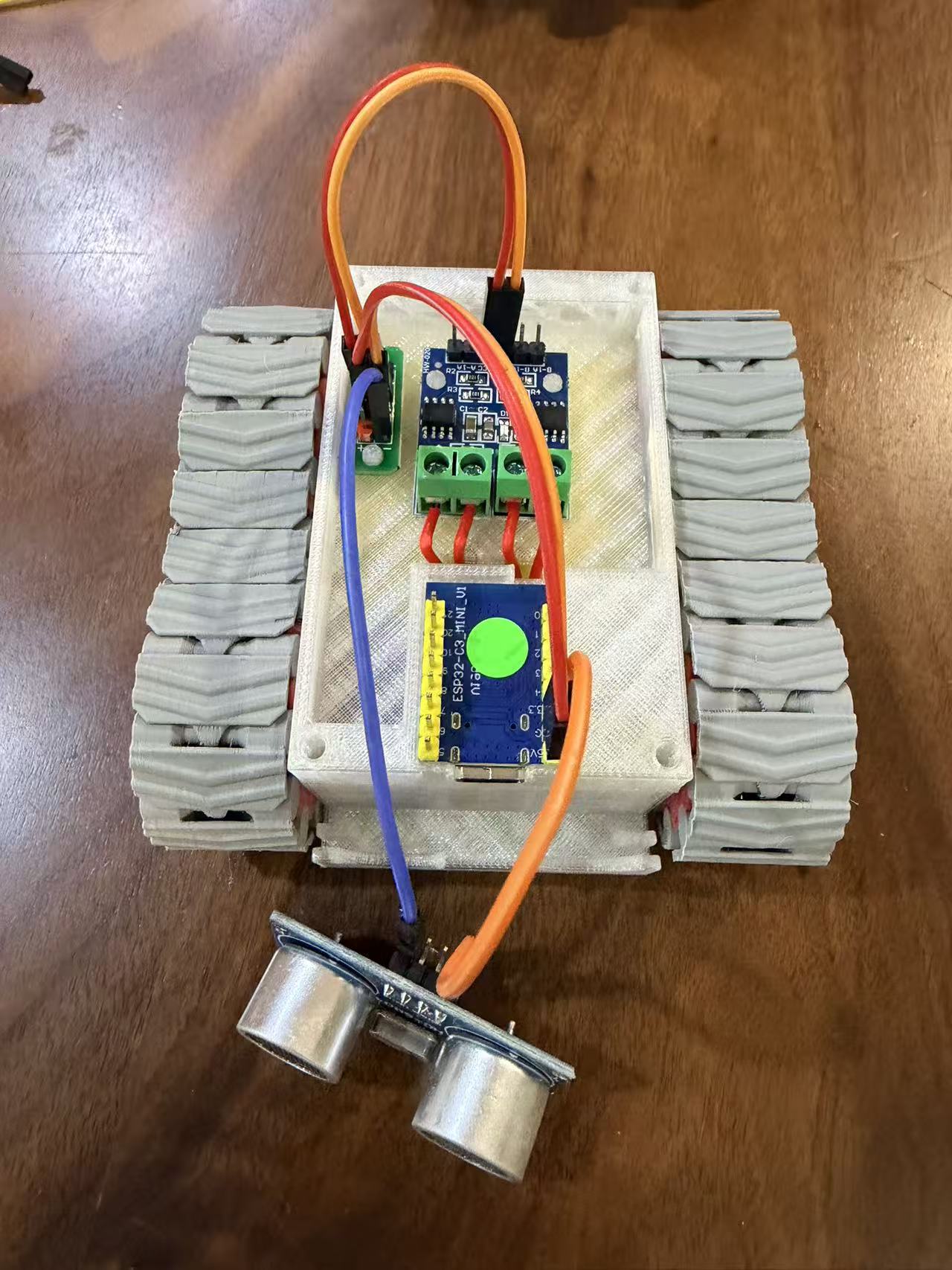
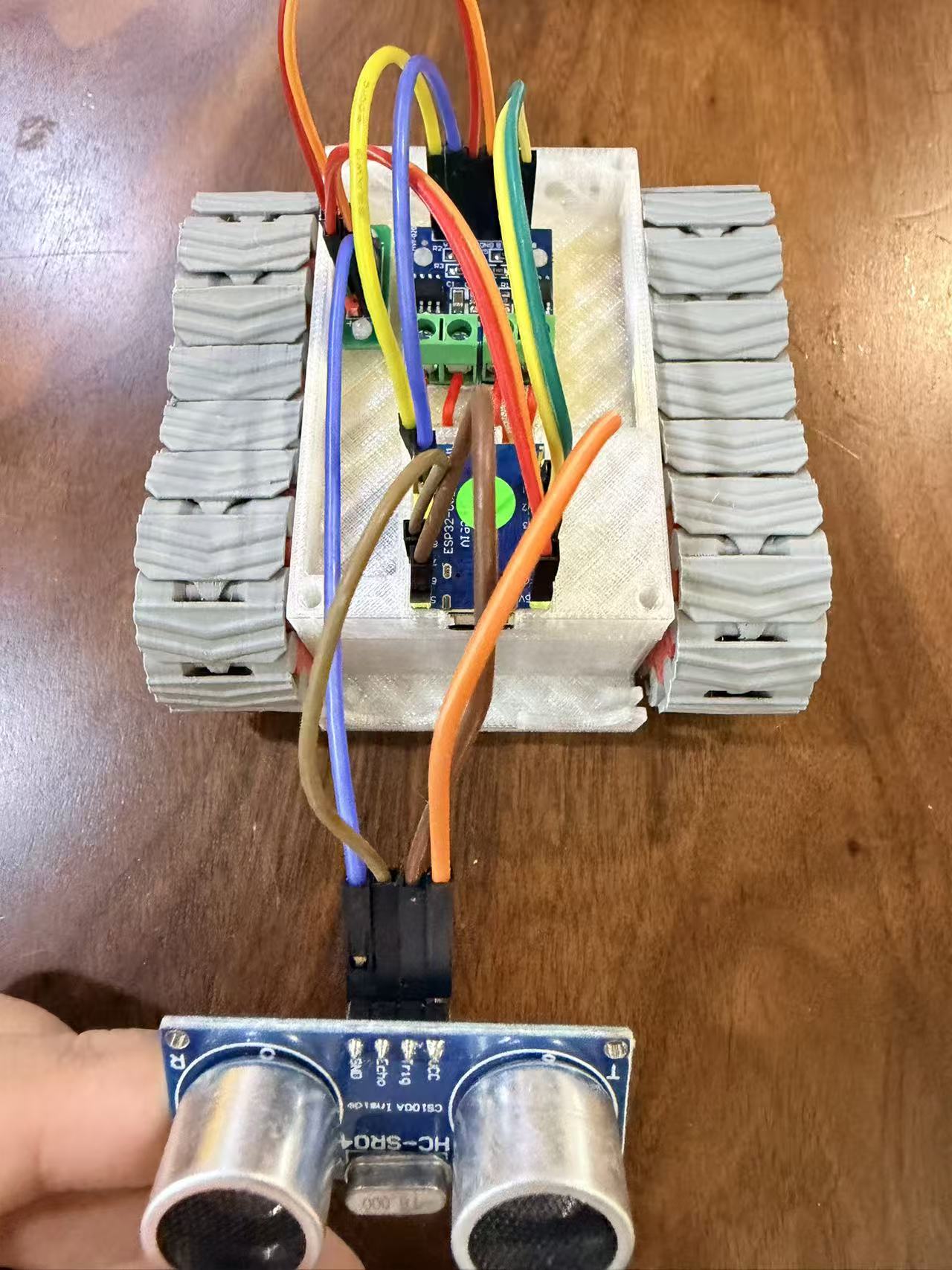
Wiring Table
| ESP32 | Board | Parts |
|---|---|---|
| 1 | L9110N A-1A | Motor R |
| 2 | L9110N A-1B | Motor R |
| 3 | L9110N B-1A | Motor L |
| 4 | L9110N B-1B | Motor L |
| 20 | HC-SR04 Trigger | Ultrasonic Sensor |
| 21 | HC-SR04 Echo | Ultrasonic Sensor |
| 5V | DC bus | Battery Box |
| GND | DC bus | Battery Box |
| 3.3V | HC-SR04 VCC | Ultrasonic Sensor |
6. Flash the Program
Figure 11 shows the programming step. After the wiring is complete, upload the initial firmware to the ESP32-C3 Mini and test the motor direction before closing the body.
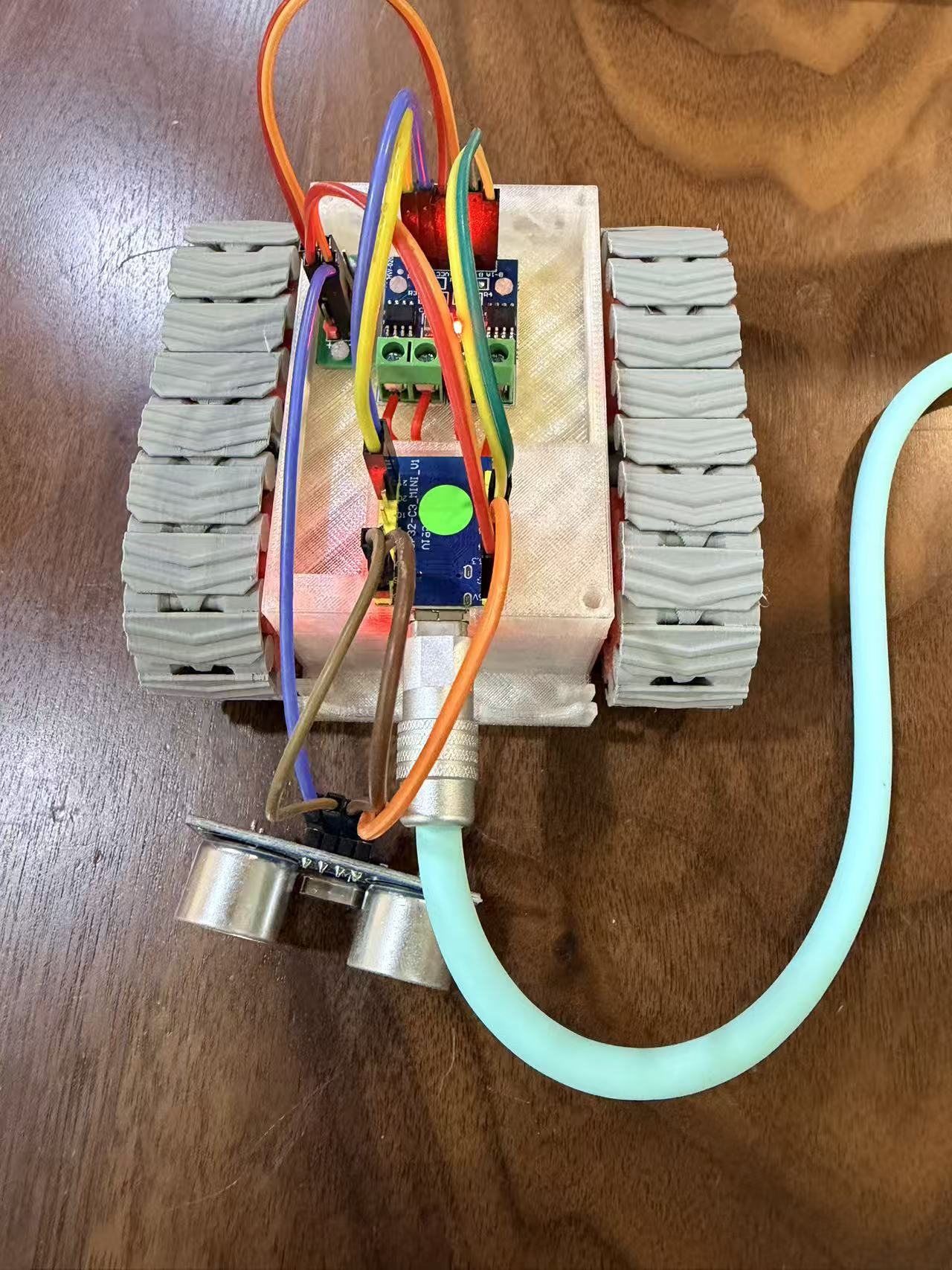
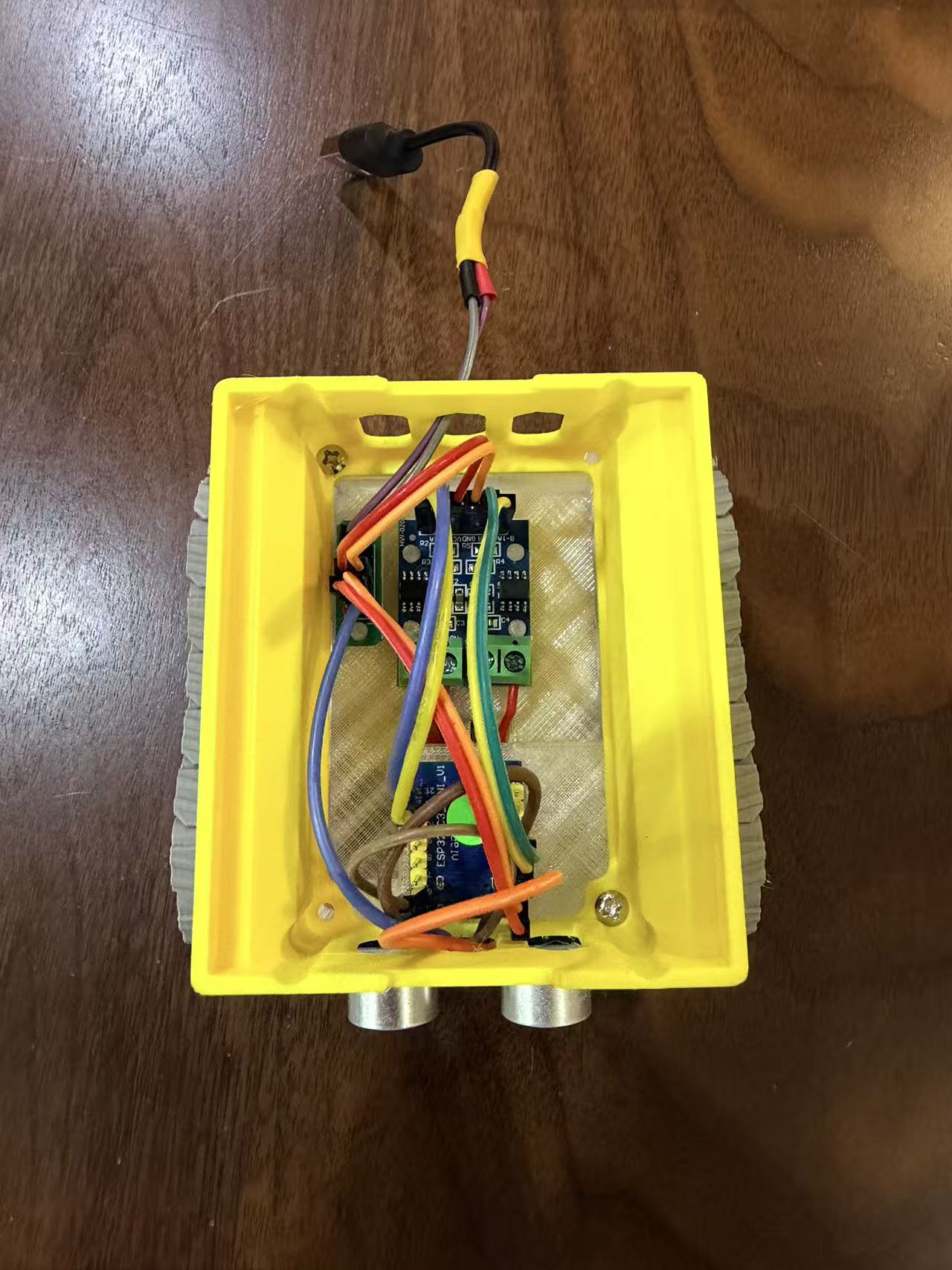
7. Install the Upper Cover and Battery Holder
Figure 12 shows the second body cover installed. This piece also works as the battery holder support, keeping the battery pack above the controller layer.
8. Final Assembly
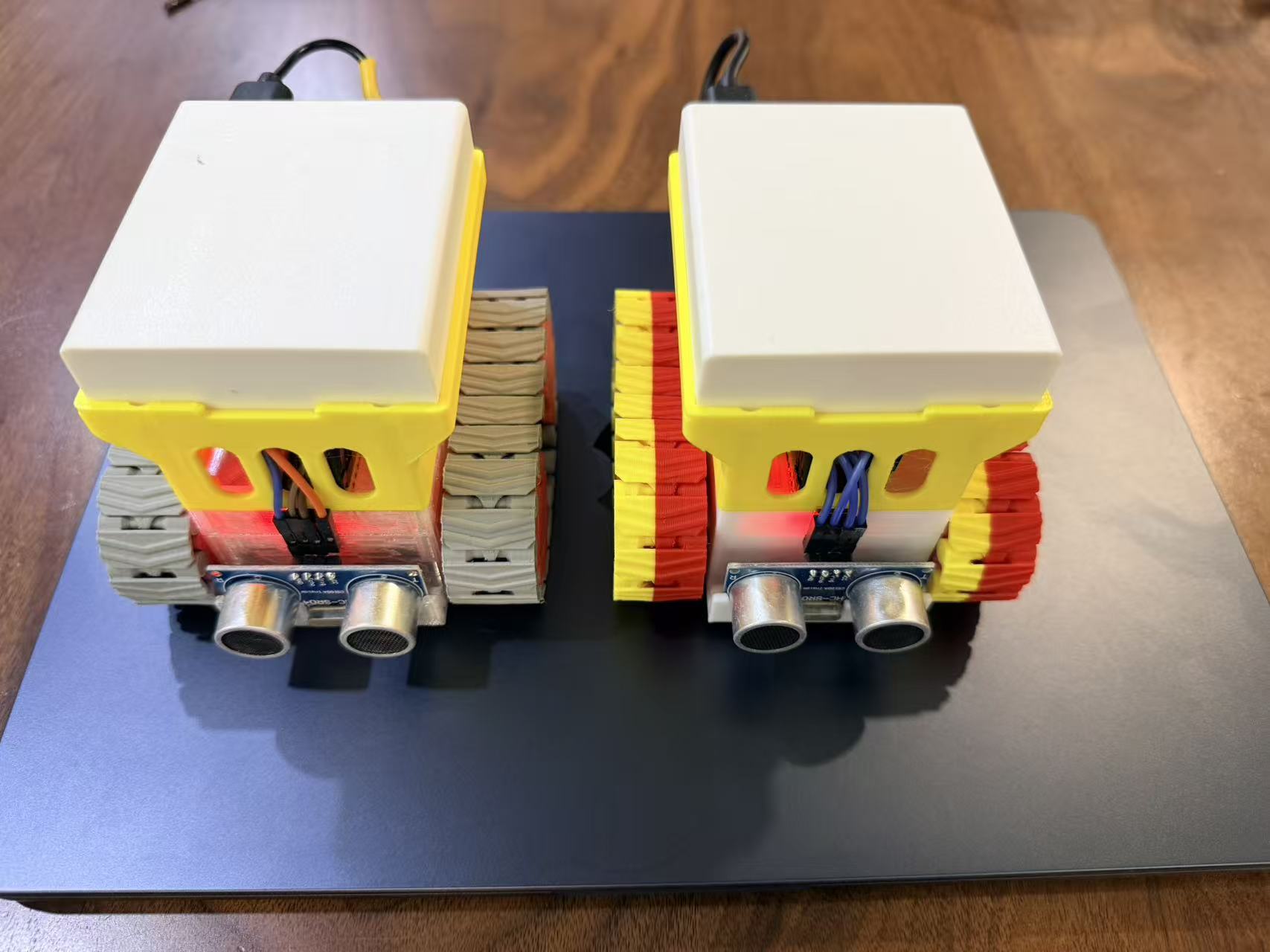
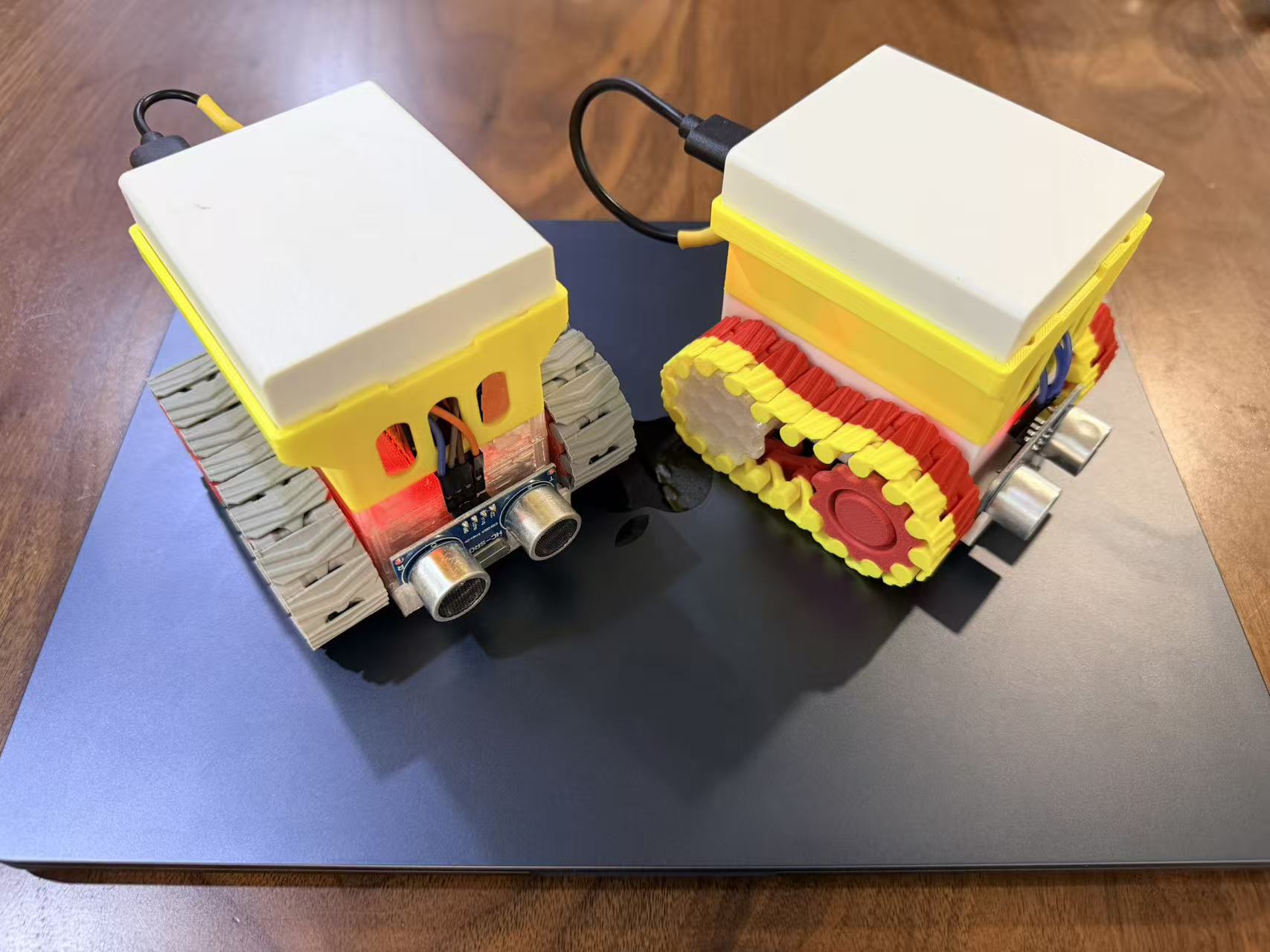
Figures 13 and 14 show the finished mini tank platform. At this stage, the base is ready for firmware tuning, ultrasonic sensing tests, and higher-level robot behavior experiments.
9. Minimal Vibe Coding Prompt
Minimal Vibe Coding Prompt
Write an Arduino IDE program for an ESP32-C3 web-controlled mini tank. Put all code in a single .ino file. It must compile with Arduino ESP32 core 3.x and be ready to upload.

Hardware:
- ESP32-C3 + L9110S dual motor driver + two DC motors
- Right motor on L9110S channel A:
  - GPIO1 -> A-1A
  - GPIO2 -> A-1B
- Left motor on L9110S channel B:
  - GPIO3 -> B-1A
  - GPIO4 -> B-1B
- HC-SR04 ultrasonic sensor:
  - TRIG -> GPIO20
  - ECHO -> GPIO21

Motor control:
- Do not use PWM. Use only digitalWrite HIGH/LOW.
- L9110S rules:
  - 1A HIGH, 1B LOW = forward
  - 1A LOW, 1B HIGH = reverse
  - 1A LOW, 1B LOW = stop
- Implement forward, backward, left turn, right turn, and stop.
- When reversing direction, stop the affected motor first, wait 100ms, then apply the new direction.

Web control:
- ESP32-C3 creates a Wi-Fi AP:
  - SSID: ESP32C3-Tank
  - Password: 12345678
  - IP: 192.168.4.1
- Use WiFi.h, WebServer.h, and DNSServer.h.
- Provide web buttons:
  - Forward, Backward, Left, Right, Stop, Test connection, Restart ESP32
- Direction buttons should move while pressed and send Stop when released.
- Send Stop automatically when the page loses focus or becomes hidden.
- Add captive portal support and redirect unknown paths to the home page.

Ultrasonic obstacle avoidance:
- When the user is not controlling the tank, periodically read the HC-SR04 distance.
- If distance is below 5cm, automatically reverse for 2 seconds, then stop.
- Manual user control has highest priority: user input must prevent or interrupt obstacle avoidance.
- Implement obstacle avoidance with a millis() state machine, not delay(2000).
10. Vibe Coding Prompt
Vibe Coding Prompt
Please write an Arduino IDE program for an ESP32-C3 web-controlled mini tank, including HC-SR04 ultrasonic obstacle avoidance.

Project structure:
- Use a dedicated Arduino sketch folder to avoid Arduino IDE merging multiple .ino files in the same directory.
- Put the ultrasonic version here:
  Tank_web_ultrasoni/Tank_web_ultrasoni.ino
- Keep all code in a single .ino file.
- Must compile with Arduino ESP32 core 3.x.
- Include:
  - WiFi.h
  - WebServer.h
  - DNSServer.h

Hardware:
- ESP32-C3 drives two DC motors through an L9110S H-bridge.
- Right motor uses L9110S channel A.
- Left motor uses L9110S channel B.
- Motor wiring:
  - GPIO1  -> A-1A
  - GPIO2  -> A-1B
  - GPIO3  -> B-1A
  - GPIO4  -> B-1B
- GPIO1/GPIO2 are used for the right motor.
- GPIO3/GPIO4 are used for the left motor.
- HC-SR04 ultrasonic sensor:
  - Power and common ground are already connected.
  - TRIG -> ESP32-C3 GPIO20
  - ECHO -> ESP32-C3 GPIO21

Motor logic:
- Do not use PWM. Use only digitalWrite HIGH/LOW on/off control.
- L9110S rules:
  - 1A = HIGH, 1B = LOW: motor forward
  - 1A = LOW, 1B = HIGH: motor reverse
  - 1A = LOW, 1B = LOW: stop
- Forward: both motors forward
- Backward: both motors reverse
- Turn left: right motor forward, left motor reverse
- Turn right: right motor reverse, left motor forward
- Stop: all four motor control pins LOW
- Keep direction-change protection:
  - When any motor switches from forward to reverse or reverse to forward, first set both pins of that motor LOW, wait 100ms, then output the new direction.
  - If both motors need reversing at the same time, stop all motors that need reversing first, wait one shared 100ms delay, then output the new directions.

Wi-Fi and web UI:
- ESP32-C3 creates a Wi-Fi AP.
- SSID: ESP32C3-Tank
- Password: 12345678
- Fixed AP IP: 192.168.4.1
- After connecting to this Wi-Fi, open http://192.168.4.1/ in a browser.
- Use WebServer for the web page and the /cmd?do=... control API.
- Web page buttons:
  - Forward
  - Backward
  - Turn left
  - Turn right
  - Stop
  - Test connection
  - Restart ESP32
- Direction buttons must support press-and-hold movement. Releasing the button sends Stop automatically.
- When the page loses focus or becomes hidden, send Stop automatically.
- Button text must not be accidentally selected:
  - Use CSS user-select: none, -webkit-user-select: none, touch-action: none
  - Disable -webkit-touch-callout
  - preventDefault() for selectstart and contextmenu events on buttons
- Add captive portal compatibility:
  - Use DNSServer to resolve all domains to 192.168.4.1
  - Handle /generate_204, /gen_204, /hotspot-detect.html, /fwlink
  - Redirect unknown paths to the home page.

Onboard LED feedback:
- Onboard LED feedback is disabled so it cannot conflict with motor pins.
- Set FEEDBACK_LED_PIN = -1.
- Keep the feedback LED helper functions safe: if FEEDBACK_LED_PIN < 0, they should immediately return.
- If a separate feedback LED is added later, FEEDBACK_LED_PIN can be changed to a free GPIO.
- Restart command is the exception: after responding, a short delay before ESP.restart() is acceptable.

Ultrasonic obstacle avoidance:
- Use HC-SR04 measurement:
  - Set TRIG LOW for 2us
  - Set TRIG HIGH for 10us
  - Set TRIG LOW
  - Read echo duration with pulseIn(ECHO, HIGH, 25000)
  - If pulseIn returns 0, treat the reading as invalid
  - Convert distance using durationUs / 58.0 to get centimeters
- Measurement interval: 120ms.
- Obstacle threshold: less than 5cm.
- When a valid measured distance is below 5cm, the tank automatically reverses for 2 seconds, then stops.
- Obstacle avoidance reverse must be implemented as a millis() state machine, not delay(2000), so WebServer can still respond to user commands.
- User control has highest priority:
  - When the user presses and holds Forward, Backward, Left, or Right, set userControlActive = true.
  - While the user is controlling the tank, obstacle avoidance must not take over.
  - If obstacle avoidance is currently reversing and the user sends a direction command, immediately cancel avoidance and execute the user command.
  - When the user releases the button and sends S/STOP, set userControlActive = false and stop the motors. Only then can obstacle avoidance resume.
- PING must not change the user-control state.
- Before REBOOT, cancel avoidance, clear user-control state, stop all motors, send the HTTP response, briefly delay, then call ESP.restart().

setup() must:
- Serial.begin(115200)
- Initialize all motor control pins as OUTPUT and stop all motors
- Initialize onboard LED as OUTPUT and off by default
- Initialize HC-SR04:
  - TRIG as OUTPUT and LOW
  - ECHO as INPUT
- Initialize Wi-Fi AP
- Start DNS server
- Register HTTP routes and start WebServer

loop() must call:
- server.handleClient()
- dnsServer.processNextRequest()
- updateFeedbackBlink()
- updateObstacleAvoidance()

Implementation requirements:
- Code should be clear, stable, and suitable for direct upload to ESP32-C3.
- Remember Arduino IDE behavior: do not keep multiple independent .ino files in the same sketch folder, or Arduino will merge them and cause redefinition errors.
11. Firmware Code
ESP32-C3 Mini Tank Firmware
#include <WiFi.h>
#include <WebServer.h>
#include <DNSServer.h>
// Wi-Fi AP settings
static const char *AP_SSID = "ESP32C3-Tank";
static const char *AP_PASSWORD = "12345678";
static const IPAddress AP_IP(192, 168, 4, 1);
static const IPAddress AP_GATEWAY(192, 168, 4, 1);
static const IPAddress AP_NETMASK(255, 255, 255, 0);
static const byte DNS_PORT = 53;
// L9110S wiring
static const int RIGHT_MOTOR_1A_PIN = 1;  // GPIO1 -> A-1A
static const int RIGHT_MOTOR_1B_PIN = 2;  // GPIO2 -> A-1B
static const int LEFT_MOTOR_1A_PIN = 3;   // GPIO3  -> B-1A
static const int LEFT_MOTOR_1B_PIN = 4;   // GPIO4  -> B-1B
// HC-SR04 ultrasonic sensor wiring
static const int ULTRASONIC_TRIG_PIN = 20; // GPIO20 -> TRIG
static const int ULTRASONIC_ECHO_PIN = 21; // GPIO21 -> ECHO
// Onboard LED feedback is disabled so it cannot conflict with motor pins.
// Set to a free GPIO if you add a separate feedback LED later.
static const int FEEDBACK_LED_PIN = -1;
static const bool FEEDBACK_LED_ACTIVE_LOW = true;
static const uint8_t LED_ON_LEVEL = FEEDBACK_LED_ACTIVE_LOW ? LOW : HIGH;
static const uint8_t LED_OFF_LEVEL = FEEDBACK_LED_ACTIVE_LOW ? HIGH : LOW;
static const unsigned long LED_BLINK_MS = 60;
static const unsigned long MOTOR_REVERSE_PROTECT_MS = 100;
static const unsigned long ULTRASONIC_READ_INTERVAL_MS = 120;
static const unsigned long ULTRASONIC_ECHO_TIMEOUT_US = 25000;
static const float OBSTACLE_DISTANCE_CM = 5.0;
static const unsigned long AVOIDANCE_REVERSE_MS = 2000;
WebServer server(80);
DNSServer dnsServer;
enum MotorDirection {
  MOTOR_STOP = 0,
  MOTOR_FORWARD,
  MOTOR_REVERSE
};
enum AvoidancePhase {
  AVOIDANCE_IDLE = 0,
  AVOIDANCE_REVERSING
};
struct Motor {
  int pin1A;
  int pin1B;
  MotorDirection direction;
};
Motor rightMotor = {RIGHT_MOTOR_1A_PIN, RIGHT_MOTOR_1B_PIN, MOTOR_STOP};
Motor leftMotor = {LEFT_MOTOR_1A_PIN, LEFT_MOTOR_1B_PIN, MOTOR_STOP};
bool feedbackBlinking = false;
unsigned long feedbackBlinkStartedAt = 0;
bool userControlActive = false;
AvoidancePhase avoidancePhase = AVOIDANCE_IDLE;
bool waitingForObstacleClear = false;
unsigned long lastUltrasonicReadAt = 0;
unsigned long avoidancePhaseStartedAt = 0;
static const char INDEX_HTML[] PROGMEM = R"rawliteral(
<!doctype html>
<html lang="zh-CN">
<head>
  <meta charset="utf-8">
  <meta name="viewport" content="width=device-width, initial-scale=1">
  <title>ESP32-C3 Tank</title>
  <style>
    :root {
      --bg: #f6f7f9;
      --panel: #ffffff;
      --text: #15181d;
      --muted: #667085;
      --border: #d9dee7;
      --primary: #1f6feb;
      --danger: #d92d20;
      --ok: #079455;
    }
    * {
      box-sizing: border-box;
      -webkit-tap-highlight-color: transparent;
      -webkit-touch-callout: none;
    }
    body {
      margin: 0;
      min-height: 100vh;
      display: flex;
      justify-content: center;
      align-items: center;
      padding: 18px;
      color: var(--text);
      background: var(--bg);
      font-family: -apple-system, BlinkMacSystemFont, "Segoe UI", Arial, sans-serif;
    }
    main {
      width: min(440px, 100%);
      padding: 18px;
      border: 1px solid var(--border);
      border-radius: 8px;
      background: var(--panel);
      box-shadow: 0 12px 34px rgba(21, 24, 29, 0.10);
    }
    h1 {
      margin: 0 0 6px;
      font-size: 22px;
      line-height: 1.25;
      letter-spacing: 0;
    }
    .meta {
      margin: 0 0 18px;
      color: var(--muted);
      font-size: 14px;
      line-height: 1.45;
    }
    .pad {
      display: grid;
      grid-template-columns: repeat(3, minmax(0, 1fr));
      gap: 10px;
      user-select: none;
      touch-action: none;
    }
    button {
      min-height: 86px;
      border: 1px solid var(--border);
      border-radius: 8px;
      background: #fff;
      color: var(--text);
      font-size: 18px;
      font-weight: 700;
      cursor: pointer;
      user-select: none;
      -webkit-user-select: none;
      -moz-user-select: none;
      -ms-user-select: none;
      touch-action: none;
      transition: transform 80ms ease, background 80ms ease, border-color 80ms ease;
    }
    button:active,
    button.active {
      transform: translateY(1px);
      border-color: var(--primary);
      background: #eff6ff;
    }
    .stop {
      color: #fff;
      border-color: var(--danger);
      background: var(--danger);
    }
    .stop:active,
    .stop.active {
      background: #b42318;
      border-color: #b42318;
    }
    .actions {
      display: grid;
      grid-template-columns: 1fr 1fr;
      gap: 10px;
      margin-top: 12px;
    }
    .actions button {
      min-height: 54px;
      font-size: 15px;
      font-weight: 700;
    }
    .status {
      min-height: 22px;
      margin-top: 14px;
      color: var(--muted);
      font-size: 14px;
      line-height: 1.45;
    }
    .ok {
      color: var(--ok);
    }
    .err {
      color: var(--danger);
    }
  </style>
</head>
<body>
  <main>
    <h1>ESP32-C3 小坦克控制</h1>
    <p class="meta">Wi-Fi: ESP32C3-Tank / 12345678<br>地址: http://192.168.4.1/</p>
    <section class="pad" aria-label="方向控制">
      <span></span>
      <button id="forward" data-cmd="F">前进</button>
      <span></span>
      <button id="left" data-cmd="L">左转</button>
      <button id="stop" class="stop" data-cmd="S">停止</button>
      <button id="right" data-cmd="R">右转</button>
      <span></span>
      <button id="backward" data-cmd="B">后退</button>
      <span></span>
    </section>
    <section class="actions" aria-label="系统控制">
      <button id="ping">测试连接</button>
      <button id="reboot">重启 ESP32</button>
    </section>
    <div id="status" class="status">Ready</div>
  </main>
  <script>
    const statusEl = document.getElementById('status');
    let heldButton = null;
    function setStatus(text, kind) {
      statusEl.textContent = text;
      statusEl.className = 'status ' + (kind || '');
    }
    async function sendCmd(cmd) {
      try {
        const response = await fetch('/cmd?do=' + encodeURIComponent(cmd), { cache: 'no-store' });
        const text = await response.text();
        setStatus(text, response.ok ? 'ok' : 'err');
        return response.ok;
      } catch (error) {
        setStatus('连接失败: ' + error, 'err');
        return false;
      }
    }
    function releaseHold() {
      if (!heldButton) {
        return;
      }
      heldButton.classList.remove('active');
      heldButton = null;
      sendCmd('S');
    }
    function bindHoldButton(button) {
      button.addEventListener('selectstart', function (event) {
        event.preventDefault();
      });
      button.addEventListener('contextmenu', function (event) {
        event.preventDefault();
      });
      button.addEventListener('pointerdown', function (event) {
        event.preventDefault();
        if (heldButton === button) {
          return;
        }
        releaseHold();
        heldButton = button;
        button.classList.add('active');
        button.setPointerCapture(event.pointerId);
        sendCmd(button.dataset.cmd);
      });
      button.addEventListener('pointerup', function (event) {
        event.preventDefault();
        releaseHold();
      });
      button.addEventListener('pointercancel', releaseHold);
      button.addEventListener('lostpointercapture', releaseHold);
    }
    ['forward', 'backward', 'left', 'right'].forEach(function (id) {
      bindHoldButton(document.getElementById(id));
    });
    document.getElementById('stop').addEventListener('click', function () {
      releaseHold();
      sendCmd('S');
    });
    document.getElementById('ping').addEventListener('click', function () {
      sendCmd('PING');
    });
    document.getElementById('reboot').addEventListener('click', async function () {
      releaseHold();
      await sendCmd('S');
      await sendCmd('REBOOT');
    });
    window.addEventListener('blur', releaseHold);
    document.addEventListener('visibilitychange', function () {
      if (document.hidden) {
        releaseHold();
      }
    });
  </script>
</body>
</html>
)rawliteral";
void triggerFeedbackBlink() {
  if (FEEDBACK_LED_PIN < 0) {
    return;
  }
  digitalWrite(FEEDBACK_LED_PIN, LED_ON_LEVEL);
  feedbackBlinking = true;
  feedbackBlinkStartedAt = millis();
}
void updateFeedbackBlink() {
  if (FEEDBACK_LED_PIN < 0) {
    return;
  }
  if (feedbackBlinking && millis() - feedbackBlinkStartedAt >= LED_BLINK_MS) {
    digitalWrite(FEEDBACK_LED_PIN, LED_OFF_LEVEL);
    feedbackBlinking = false;
  }
}
void writeMotorPins(const Motor &motor, int level1A, int level1B) {
  digitalWrite(motor.pin1A, level1A);
  digitalWrite(motor.pin1B, level1B);
}
void stopMotor(Motor &motor) {
  writeMotorPins(motor, LOW, LOW);
  motor.direction = MOTOR_STOP;
}
bool needsReverseProtection(const Motor &motor, MotorDirection newDirection) {
  return motor.direction != MOTOR_STOP && newDirection != MOTOR_STOP && motor.direction != newDirection;
}
void applyMotorDirection(Motor &motor, MotorDirection newDirection) {
  if (newDirection == MOTOR_STOP) {
    stopMotor(motor);
    return;
  }
  if (newDirection == MOTOR_FORWARD) {
    writeMotorPins(motor, HIGH, LOW);
  } else {
    writeMotorPins(motor, LOW, HIGH);
  }
  motor.direction = newDirection;
}
void stopAllMotors() {
  stopMotor(rightMotor);
  stopMotor(leftMotor);
}
void setTankMotion(MotorDirection rightDirection, MotorDirection leftDirection) {
  bool protectRight = needsReverseProtection(rightMotor, rightDirection);
  bool protectLeft = needsReverseProtection(leftMotor, leftDirection);
  if (protectRight) {
    stopMotor(rightMotor);
  }
  if (protectLeft) {
    stopMotor(leftMotor);
  }
  if (protectRight || protectLeft) {
    delay(MOTOR_REVERSE_PROTECT_MS);
  }
  applyMotorDirection(rightMotor, rightDirection);
  applyMotorDirection(leftMotor, leftDirection);
}
void moveForward() {
  setTankMotion(MOTOR_FORWARD, MOTOR_FORWARD);
}
void moveBackward() {
  setTankMotion(MOTOR_REVERSE, MOTOR_REVERSE);
}
void turnLeft() {
  setTankMotion(MOTOR_FORWARD, MOTOR_REVERSE);
}
void turnRight() {
  setTankMotion(MOTOR_REVERSE, MOTOR_FORWARD);
}
float readUltrasonicDistanceCm() {
  digitalWrite(ULTRASONIC_TRIG_PIN, LOW);
  delayMicroseconds(2);
  digitalWrite(ULTRASONIC_TRIG_PIN, HIGH);
  delayMicroseconds(10);
  digitalWrite(ULTRASONIC_TRIG_PIN, LOW);
  unsigned long echoDurationUs = pulseIn(ULTRASONIC_ECHO_PIN, HIGH, ULTRASONIC_ECHO_TIMEOUT_US);
  if (echoDurationUs == 0) {
    return -1.0;
  }
  return echoDurationUs / 58.0;
}
void startAvoidanceReverse() {
  avoidancePhase = AVOIDANCE_REVERSING;
  avoidancePhaseStartedAt = millis();
  waitingForObstacleClear = true;
  moveBackward();
}
void stopAvoidance() {
  avoidancePhase = AVOIDANCE_IDLE;
  stopAllMotors();
}
void cancelAvoidanceForUserControl() {
  avoidancePhase = AVOIDANCE_IDLE;
  waitingForObstacleClear = false;
}
void updateObstacleAvoidance() {
  if (userControlActive) {
    return;
  }
  unsigned long now = millis();
  if (avoidancePhase == AVOIDANCE_REVERSING) {
    if (now - avoidancePhaseStartedAt >= AVOIDANCE_REVERSE_MS) {
      stopAvoidance();
    }
    return;
  }
  if (now - lastUltrasonicReadAt < ULTRASONIC_READ_INTERVAL_MS) {
    return;
  }
  lastUltrasonicReadAt = now;
  float distanceCm = readUltrasonicDistanceCm();
  if (waitingForObstacleClear) {
    if (distanceCm <= 0 || distanceCm >= OBSTACLE_DISTANCE_CM) {
      waitingForObstacleClear = false;
    }
    return;
  }
  if (distanceCm > 0 && distanceCm < OBSTACLE_DISTANCE_CM) {
    startAvoidanceReverse();
  }
}
void sendIndexPage() {
  server.send_P(200, "text/html; charset=utf-8", INDEX_HTML);
}
void redirectToRoot() {
  server.sendHeader("Location", String("http://") + AP_IP.toString() + "/", true);
  server.send(302, "text/plain; charset=utf-8", "Redirecting to controller");
}
void handleCommand() {
  if (!server.hasArg("do")) {
    server.send(400, "text/plain; charset=utf-8", "Missing command");
    return;
  }
  String command = server.arg("do");
  command.trim();
  command.toUpperCase();
  triggerFeedbackBlink();
  if (command == "F") {
    cancelAvoidanceForUserControl();
    userControlActive = true;
    moveForward();
    server.send(200, "text/plain; charset=utf-8", "OK: 前进");
  } else if (command == "B") {
    cancelAvoidanceForUserControl();
    userControlActive = true;
    moveBackward();
    server.send(200, "text/plain; charset=utf-8", "OK: 后退");
  } else if (command == "L") {
    cancelAvoidanceForUserControl();
    userControlActive = true;
    turnLeft();
    server.send(200, "text/plain; charset=utf-8", "OK: 左转");
  } else if (command == "R") {
    cancelAvoidanceForUserControl();
    userControlActive = true;
    turnRight();
    server.send(200, "text/plain; charset=utf-8", "OK: 右转");
  } else if (command == "S" || command == "STOP") {
    cancelAvoidanceForUserControl();
    userControlActive = false;
    stopAllMotors();
    server.send(200, "text/plain; charset=utf-8", "OK: 停止");
  } else if (command == "PING") {
    server.send(200, "text/plain; charset=utf-8", "PONG");
  } else if (command == "REBOOT") {
    cancelAvoidanceForUserControl();
    userControlActive = false;
    stopAllMotors();
    server.send(200, "text/plain; charset=utf-8", "Rebooting");
    delay(150);
    ESP.restart();
  } else {
    server.send(400, "text/plain; charset=utf-8", "Unknown command");
  }
}
void setupMotorPins() {
  pinMode(RIGHT_MOTOR_1A_PIN, OUTPUT);
  pinMode(RIGHT_MOTOR_1B_PIN, OUTPUT);
  pinMode(LEFT_MOTOR_1A_PIN, OUTPUT);
  pinMode(LEFT_MOTOR_1B_PIN, OUTPUT);
  stopAllMotors();
}
void setupFeedbackLed() {
  if (FEEDBACK_LED_PIN < 0) {
    return;
  }
  digitalWrite(FEEDBACK_LED_PIN, LED_OFF_LEVEL);
  pinMode(FEEDBACK_LED_PIN, OUTPUT);
  digitalWrite(FEEDBACK_LED_PIN, LED_OFF_LEVEL);
}
void setupUltrasonicSensor() {
  pinMode(ULTRASONIC_TRIG_PIN, OUTPUT);
  pinMode(ULTRASONIC_ECHO_PIN, INPUT);
  digitalWrite(ULTRASONIC_TRIG_PIN, LOW);
}
void setupWiFiAp() {
  WiFi.mode(WIFI_AP);
  WiFi.setSleep(false);
  WiFi.softAPConfig(AP_IP, AP_GATEWAY, AP_NETMASK);
  WiFi.softAP(AP_SSID, AP_PASSWORD);
  Serial.println();
  Serial.println("ESP32-C3 Tank AP started");
  Serial.print("SSID: ");
  Serial.println(AP_SSID);
  Serial.print("Password: ");
  Serial.println(AP_PASSWORD);
  Serial.print("IP: ");
  Serial.println(WiFi.softAPIP());
}
void setupDnsServer() {
  dnsServer.start(DNS_PORT, "*", AP_IP);
}
void setupHttpRoutes() {
  server.on("/", HTTP_GET, sendIndexPage);
  server.on("/cmd", HTTP_GET, handleCommand);
  server.on("/generate_204", HTTP_GET, sendIndexPage);
  server.on("/gen_204", HTTP_GET, sendIndexPage);
  server.on("/hotspot-detect.html", HTTP_GET, sendIndexPage);
  server.on("/fwlink", HTTP_GET, sendIndexPage);
  server.onNotFound(redirectToRoot);
  server.begin();
}
void setup() {
  Serial.begin(115200);
  delay(200);
  setupMotorPins();
  setupFeedbackLed();
  setupUltrasonicSensor();
  setupWiFiAp();
  setupDnsServer();
  setupHttpRoutes();
  Serial.println("Open http://192.168.4.1/ after connecting to the AP.");
}
void loop() {
  server.handleClient();
  dnsServer.processNextRequest();
  updateFeedbackBlink();
  updateObstacleAvoidance();
}